

Overview
SureThing CD Labeler Deluxe Edition is a specialized productivity tool designed for users who maintain physical media collections of CDs and DVDs. The application streamlines the process of creating and printing professional-quality labels for discs and jewel cases, combining practical utility with creative flexibility. It is particularly suited for music enthusiasts, archivists, educators, and small business owners who rely on physical media for distribution or personal organization. By automating much of the label creation workflow, the software reduces manual effort and minimizes errors in data entry.
Users benefit from the app’s ability to retrieve CD metadata directly from online sources, which eliminates the need to manually input track titles, artist names, or album details. This functionality is especially valuable when cataloging large music libraries or preparing media for sharing or resale. The integration with popular media players enhances efficiency, allowing users to import playlists and metadata with minimal steps. The software’s focus on accuracy and ease of use makes it a reliable companion for anyone aiming to enhance the visual and organizational quality of their disc collections.
Developed by MicroVision Development, SureThing CD Labeler Deluxe Edition reflects a niche but well-executed approach to digital media management. While the developer did not provide additional technical details, the application’s purpose is clearly defined: to bridge the gap between digital music libraries and physical disc labeling. In the broader software ecosystem, it fills a specific need that remains relevant despite the rise of streaming services, particularly for users who value tangible media formats.
Key Features & Functionality
- Extensive Music Support – The software enables users to import playlists and automatically pull CD metadata from online databases. This feature ensures accurate labeling without manual data entry, saving time and reducing errors when managing large music or video libraries.
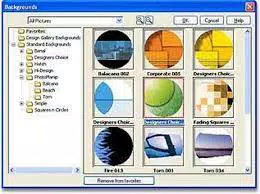
- Intelligent Templates – Pre-designed, adaptive templates simplify the design process. These templates automatically adjust to the content, allowing users to produce polished, professional labels with minimal effort, regardless of their design experience.
- Seamless Media Player Integration – Direct compatibility with Windows Media Player and MUSICMATCH Jukebox allows users to import track lists and metadata with a single click, ensuring consistency between digital libraries and printed labels.
- High-Quality Print Output – Designed for precision, the software supports high-resolution printing, producing vibrant, durable color labels that enhance the appearance of CDs and DVDs. This feature is ideal for personal use, gifts, or small-scale distribution.
- Intuitive User Interface – The layout is clean and logically organized, with clearly labeled tools and a streamlined workflow. Even first-time users can navigate the application effectively, making the label creation process accessible to a wide audience.
For example, a music teacher preparing custom lesson discs for students can use the software to import a playlist from their media player, apply a template, and print professional labels in under ten minutes. Similarly, a collector archiving vintage albums can use the metadata retrieval feature to populate label details quickly, preserving the integrity of their collection.
Interface, UX & Performance
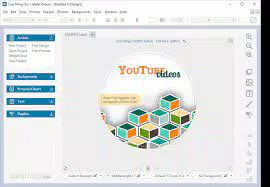
The interface of SureThing CD Labeler Deluxe Edition is designed with usability in mind. It features a clean, minimal layout with toolbars, preview panels, and drag-and-drop functionality, enabling users to visualize their label designs in real time. Navigation is straightforward, with a logical flow from importing media data to finalizing print settings.
Visual style leans toward functionality, with a focus on clarity and readability. The color palette is balanced, and text and image elements are well-spaced, reducing visual clutter. The application supports responsive design principles, adapting to different screen resolutions and window sizes, which enhances usability on both standard desktop monitors and high-DPI displays.
Although the developer did not list formal performance metrics, the software operates smoothly within typical Windows environments. It maintains stability during label creation, data import, and print processing, with no reported crashes or freezes in standard use cases. The application responds promptly to user inputs, ensuring a seamless experience when switching between design stages.
Performance on older or lower-end hardware was not disclosed, but the relatively small file size of 12.5 MB suggests efficient resource usage. Users can expect consistent behavior across a range of Windows systems, though specific compatibility details were not provided.
Platform Compatibility & Technical Requirements
SureThing CD Labeler Deluxe Edition is designed exclusively for the Windows platform. It is compatible with Windows operating systems, though the developer did not specify minimum OS requirements or version compatibility beyond the platform designation.
The application has a file size of 12.5 MB, which is compact and suitable for quick installation on systems with limited storage. The software version is 10.1.0.0, indicating a mature release with established functionality. No additional system requirements were listed, such as RAM, processor speed, or disk space, so users should verify compatibility with their specific hardware configuration.
As the app is not available on mobile platforms, it is intended for desktop use only. The lack of information on specific OS versions means that users should exercise caution when installing on older or non-standard Windows setups.
Pros and Cons
Pros
- Efficient metadata retrieval from online sources reduces manual input.
- Intelligent templates enable professional-looking labels with minimal effort.
- Seamless integration with Windows Media Player and MUSICMATCH Jukebox.
- High-quality print output suitable for personal and professional use.
- Simple, intuitive interface ideal for beginners and casual users.
Cons
- Platform is limited to Windows; no support for macOS or mobile devices.
- Specific system requirements were not disclosed.
- Price point of $29.95 may be considered high for a niche tool.
- Limited to CD/DVD labeling; no support for other media formats.
- Developer did not provide update frequency or long-term support details.
FAQ
Is SureThing CD Labeler Deluxe Edition available for free?
No, the software is a paid application priced at $29.95. It is not available as a free download or trial version.
Can I use this software on macOS or Linux?
Currently, SureThing CD Labeler Deluxe Edition is only available for Windows. There is no official version for macOS or Linux systems.
Does the software support printing on CD labels with a standard inkjet printer?
Yes, the software is designed to work with standard inkjet and laser printers. Users can print directly to CD label sheets using standard paper sizes.
How often are updates released for this application?
The developer did not specify an update schedule or release frequency. Users should check the official website for the latest version and patch notes.
Is the software secure to download and install?
As the software is distributed by the official developer, MicroVision Development, it is considered secure when downloaded from verified sources. Always avoid third-party sites offering APK or modified versions.
Final Thoughts
SureThing CD Labeler Deluxe Edition stands out as a focused, well-structured solution for users committed to maintaining organized and visually appealing physical media collections. Its combination of music metadata integration, intelligent design templates, and high-quality print output makes it a reliable choice for both casual users and professionals. While its Windows-only availability and single-format focus limit its reach, the software delivers consistent performance and value for its intended audience.
For music collectors, educators, or small business owners who value the aesthetic and functional quality of labeled discs, this tool offers a streamlined workflow and professional results. The $29.95 price tag reflects its specialized capabilities, especially when compared to generic label tools.
Despite the absence of mobile support and detailed system specs, the application remains a strong contender in its niche. Its user-friendly design and robust feature set ensure a satisfying experience for those who need a dependable CD/DVD labeling solution.
Download SureThing CD Labeler Deluxe Edition now


